01
Cash accounting for VAT
Briefcase Ledger now supports HMRC's cash accounting scheme alongside standard accounting. On the scheme, VAT on a sale goes on the VAT return when the customer pays, and VAT on a bill when you pay the supplier. Sales, costs, debtors and creditors are still recorded on the invoice date, so the profit and loss doesn't change.
Until an invoice or bill is paid, its VAT is held in a new Pending VAT account. Match the payment in the bank and Briefcase moves the VAT to the VAT account on the payment date. A part payment releases its share and the rest stays held.
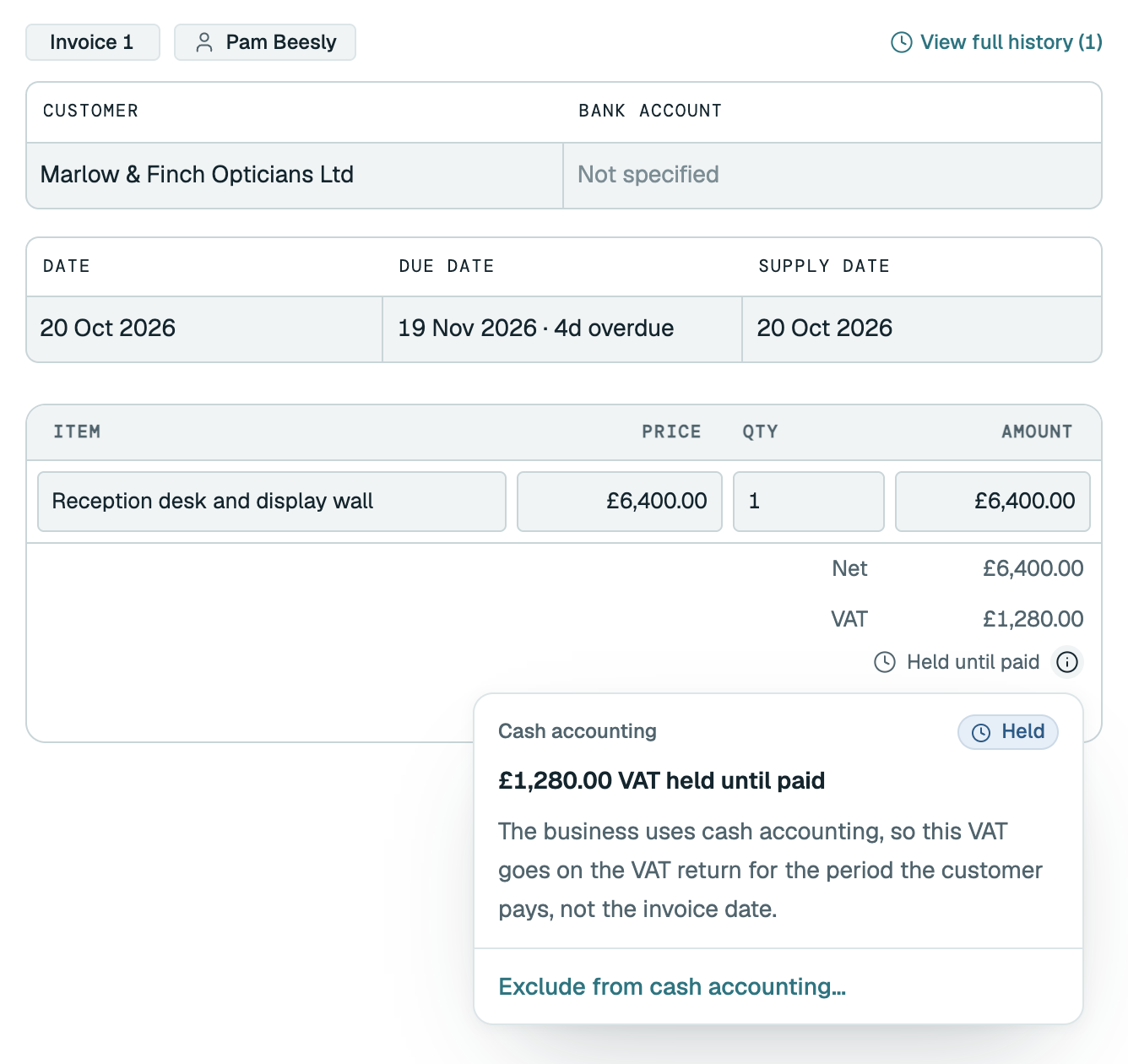
Every sales invoice, bill and credit note says where its VAT stands under the VAT amount, such as Held until paid or Declared with the payments. Click it to see why.
02
What stays outside the scheme
HMRC keeps some supplies out of cash accounting, and Briefcase counts their VAT on the invoice date: invoices and bills due more than six months after the invoice date, sales invoices issued before the supply, and reverse charge VAT. For anything else that belongs outside, such as a hire purchase or conditional sale agreement, open the note under the document's VAT, choose Exclude from cash accounting and give a reason. The reason is kept with the document.
03
On the VAT return
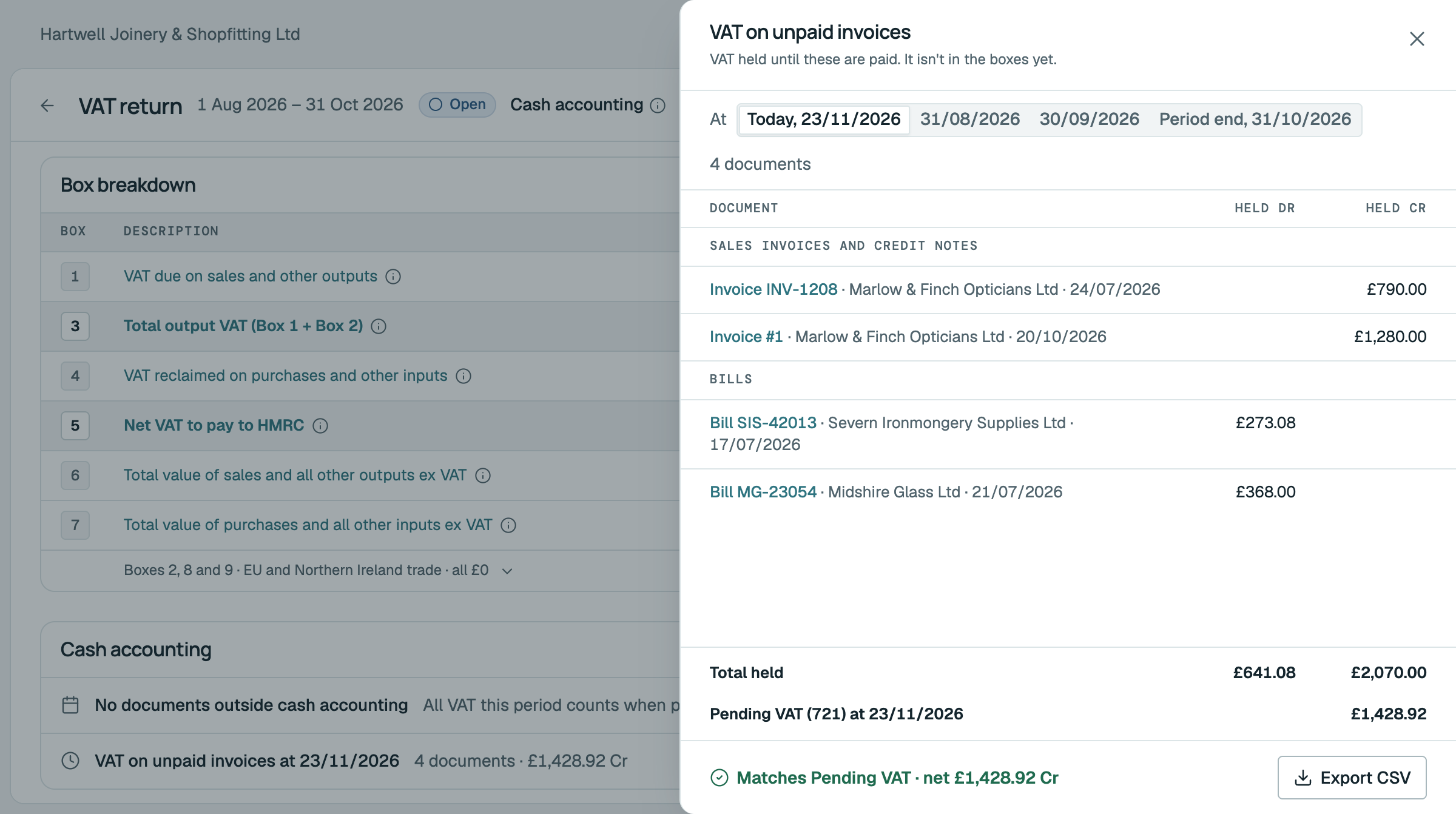
The VAT return has a Cash accounting section. VAT on unpaid invoices lists every invoice and bill still holding VAT, as at today, a month end or the period end, and checks the total against the Pending VAT account. Next to it is a list of the period's documents outside cash accounting, each with its reason.
04
Moving a cash accounting client to Briefcase Ledger
A client on cash accounting can now be imported from Xero, QuickBooks Online or Sage Accounting. Choose Cash accounting as the VAT scheme on the Start date step and upload the aged reports, which carry the VAT still outstanding on each invoice and bill.
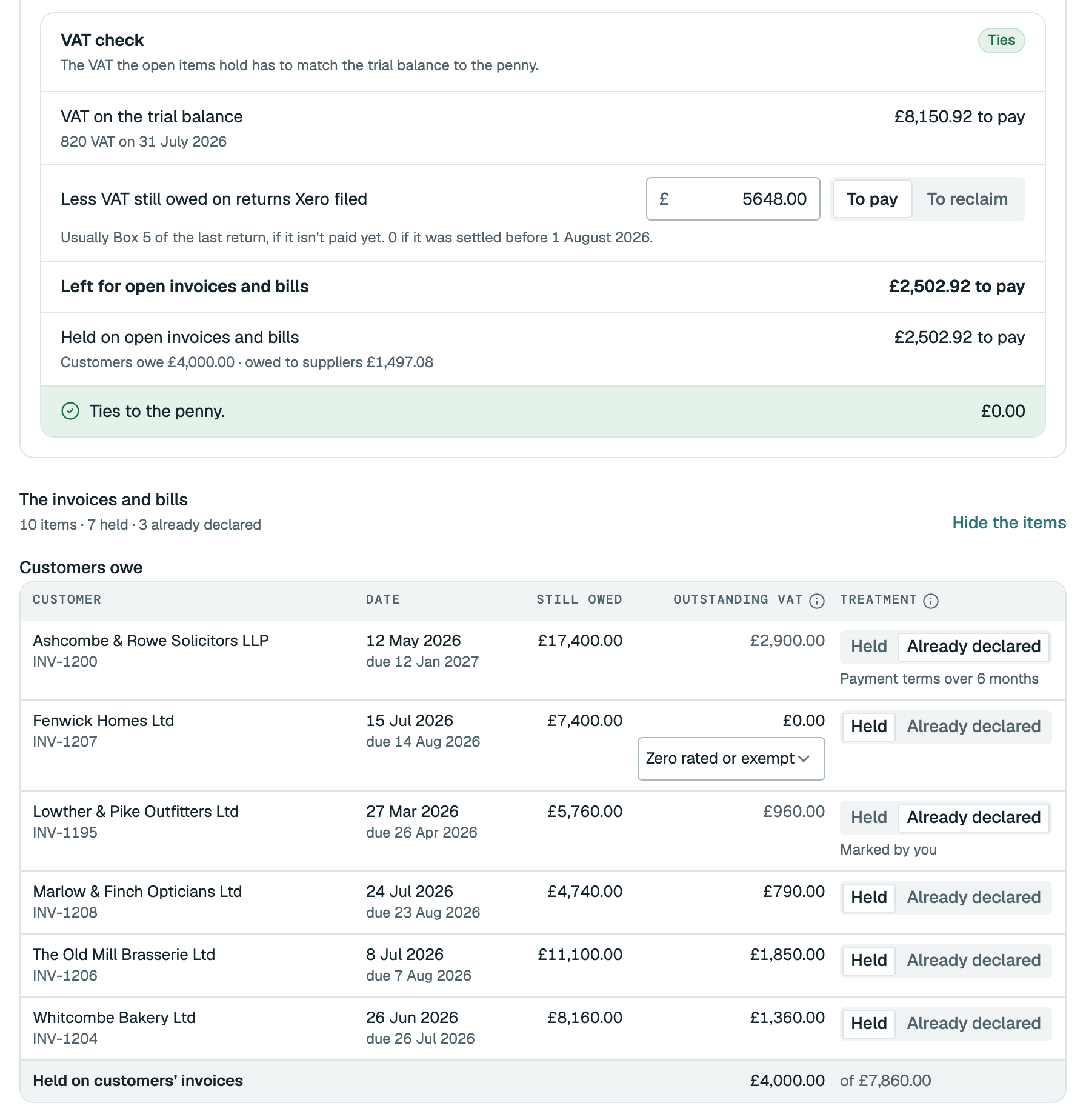
On Open invoices and bills, each item comes in as Held, so its VAT goes on a return when it's paid, or Already declared, when it was on a return filed from the previous system. Briefcase checks the held VAT against the VAT on the trial balance, less any VAT still owed on returns already filed, and you can continue once it ties to the penny.
Adding a new company instead? Choose its VAT scheme when you create it. The Flat Rate Scheme isn't supported yet. How do I migrate to Briefcase Ledger?
05
Joining and leaving
For a client already on Briefcase Ledger, open Business settings → Tax and choose Join cash accounting. It starts on the first day of the next VAT period, and invoices and bills dated from then are reposted so their VAT counts when they're paid. You confirm the business meets HMRC's conditions, and HMRC has to be connected so Briefcase knows the VAT periods.
Leave cash accounting ends the scheme with the current VAT period. Briefcase shows the VAT held today and, once the period ends, posts a settle-up dated its last day: the VAT still held on unpaid invoices and bills is declared on that period's return, which can't be submitted until the settle-up is posted. HMRC's option to spread that VAT over the next six months isn't supported.
06
More for Claude, ChatGPT and Copilot
Briefcase now connects to Microsoft Copilot Studio as well as Claude and ChatGPT, and a connected assistant can do more:
- See which clients need attention. One question covers every client you can see: documents to review, expense claims to publish, schedules to post, unreconciled bank lines, bank feeds that have expired or are about to, VAT returns and MTD for Income Tax updates coming due, month-ends not started and open paperwork requests.
- Chase paperwork. List the open requests for a client, ask for the bill or receipt behind a bank line or for missing bank statements, and send a reminder.
- Work on working papers. Read a working paper and its schedules for a Briefcase Ledger or Xero client, start the next period, and add or update schedule lines on many balance sheet accounts at once.
- Move a client's books into Briefcase Ledger. Give the assistant the exports from Xero, QuickBooks Online or Sage Accounting. It sets up the import, asks for what's missing, shows you a preview and imports once you confirm.
Anything that emails a client, starts a working paper or imports books is shown to you as a preview first, and happens only when you agree. How do I connect Claude, ChatGPT or Copilot Studio to Briefcase?