Businesses on Xero or QuickBooks
Keep your Xero or QuickBooks and hand Briefcase the receipts, invoices and month-end schedules, whether it’s just you or a finance team.
From capture to close, handled by AI. Briefcase Connect reads and codes every document, posts the month-end adjustments and builds the working papers.
The Briefcase Connect costs inbox for Harbour Lane Bakery, a business on Xero. One document is still being read, three are awaiting review, and the rest have been published to Xero, several of them by Autopilot. Each row shows the date, type, supplier, category, total, VAT rate, status and how the document arrived.
A prepayment detected from a £1,200 Hiscox insurance invoice. Briefcase has filled in the contact, description, category and dates, and built a 12-month schedule releasing £100 a month from the prepayments account to insurance. September’s journal is posted to Xero and the following months are scheduled.
The September close overview in working papers. Pending invoices, pending adjustments and the creditors and debtors review are done. In the balance sheet reconciliation, five of six accounts are reconciled to their supporting evidence, including the prepayments balance of £1,100, and VAT is still to reconcile.
One system handles the paperwork, the month-end adjustments and the working papers.
A self-learning system. Briefcase learns from every document and every correction. There are no supplier rules to set up, and it gets better the more you use it.
Receipts, bills, sales invoices, credit notes and statements come in by email, WhatsApp or web upload, from you, your team or your clients. Briefcase reads every line, checks the document is legible and complete, and flags duplicates before anything is published.
 BriefcaseReceipts and invoices
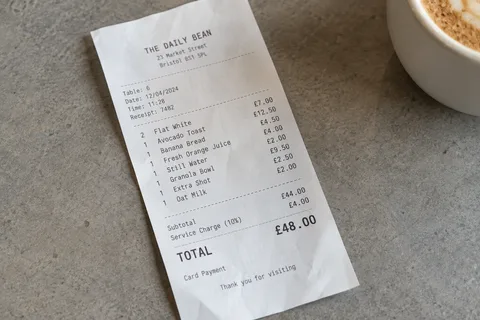 Breakfast with a client
Every line gets its account, VAT treatment and tracking. There are no supplier rules to set up: Briefcase learns from the last 12 months of coding in Xero or QuickBooks and from every correction, and shows its reasoning for each decision.
A monthly subscription to software used by the business.
Similar purchases were coded to Computer Software.
VAT number verified with HMRC.
Review and publish in a click, or turn on Autopilot. Documents that pass its checks go straight to Xero or QuickBooks. A new supplier isn’t published automatically until Briefcase is confident, and anything unusual waits for you.
When an invoice covers a future period, Briefcase recognises the prepayment as it arrives, builds the release schedule and posts the journal to Xero or QuickBooks each month. There’s no spreadsheet to keep in step with the ledger.
The close is built from the same documents and schedules. Every balance sheet account is matched to its supporting evidence, so the working papers are ready for a reviewer instead of being rebuilt in Excel each month.
 Working papers are available for businesses on Xero.
Upload a statement and Briefcase matches each line to the invoices it holds, so you can see what’s reconciled and what isn’t.
Staff claim on the web or by WhatsApp. Briefcase works out HMRC mileage rates and reclaimable VAT before publishing.
Captured, coded and published the same way as costs, so both sides of the ledger stay up to date.
When a document matches one Briefcase already has, it’s flagged as a duplicate before anything is published.



Trusted by UK accounting firms
Accounting firms and business owners rely on it to read, code and check receipts, invoices and bank lines as they arrive.
Get started
5,200,000+
Transactions processed a year
Keep your Xero or QuickBooks and hand Briefcase the receipts, invoices and month-end schedules, whether it’s just you or a finance team.
Run capture, coding and month-end across every client on Xero or QuickBooks, with each decision explained for review.
Briefcase Ledger is our own accounting system, with bank feeds, AI bank reconciliation and reports built in.
Explore Briefcase LedgerWhat people usually ask before they start.
More answers in the help centreNo. Briefcase Connect works alongside the Xero or QuickBooks you already use, for your own business or for each client. Briefcase publishes bills, sales invoices and journals to Xero or QuickBooks, and the books stay there.
No. Briefcase reasons from the document, the business and previous coding. When you connect a business, it learns from the last 12 months of coding in its ledger, so its suggestions improve from the next day.
Only if you turn on Autopilot. It publishes documents that pass its checks and holds anything uncertain for review. With Autopilot off, you review and publish each document.
No. With Connect, bank reconciliation stays in Xero or QuickBooks. Briefcase Ledger has its own bank feeds and AI bank reconciliation, if you want Briefcase to handle that too. Explore Briefcase Ledger.
Briefcase is ISO 27001 certified and GDPR compliant. Data is encrypted and stored in Europe. The AI providers we use process it under zero data retention, so they don’t store it or train their models on it. How we protect your information.
You can try Briefcase free for 14 days without a credit card, then choose the plan that suits you. Accounting firms with more clients pay less per client. See current plans and prices.