This guide explains how Briefcase billing works: licenses and plans, what counts towards your quarterly allowances (including bank transactions on Briefcase Ledger), partner pricing for accounting firms, supplier payment fees, and how auto-upgrade keeps your books moving without surprise per-document charges.
Pricing model at a glance
Every connection (a client or business) needs a license. Every plan has the same features and unlimited users. The only thing that changes between plans is volume: how many documents, and for Briefcase Ledger books how many bank transactions, each connection can process per quarter.
Plan | Documents per quarter | Ledger bank transactions per quarter |
|---|---|---|
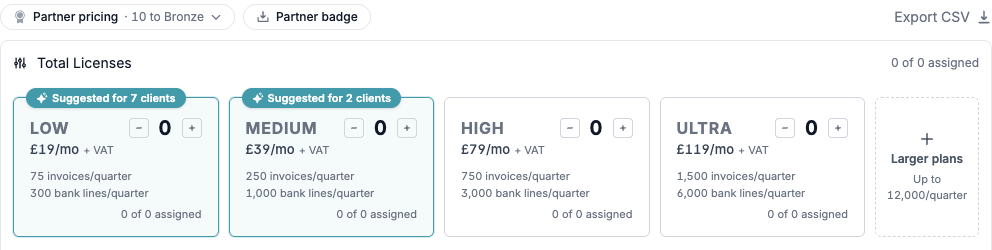
Low | 75 | 300 |
Medium | 250 | 1,000 |
High | 750 | 3,000 |
Ultra | 1,500 | 6,000 |
Ultra ×2 | 3,000 | 12,000 |
Ultra ×4 | 6,000 | 24,000 |
Ultra ×8 | 12,000 | 48,000 |
Bank transaction allowances only apply to connections whose books are kept in Briefcase Ledger. If a connection's books are in Xero or QuickBooks (Briefcase Connect), only documents count.
Prices are per license per month, plus VAT. See current prices on the pricing page, or the partner pricing page for accounting firms.
What counts towards your allowance?
Documents
Only documents that have been actioned count. Items still in review and duplicates you never publish don't count.
Published invoices, receipts and credit notes: 1 document each
Exported bank statements: 2 documents each
Reconciled supplier statements: 2 documents each
A document counts once, the first time it's published, exported or reconciled. Republishing it doesn't count again, and archiving it later doesn't remove it from the count.
Bank transactions (Briefcase Ledger only)
A bank transaction counts once, the first time it's reconciled or posted in Ledger. Lines that Briefcase posts automatically as part of a published invoice or a supplier payment made through Briefcase don't count.
Usage vs billable counts. The usage figures on the dashboard won't always match the counts on the billing page. Usage counts every document uploaded; billing counts only what has been published, exported or reconciled. The time periods can differ too (for example, the last 90 days vs your billing quarter).
Billing quarters
Allowances are measured against your subscription's own quarter, not the calendar quarter.
Your quarters run from your subscription start date (for example, if you started on 1 November 2025, your quarters are Nov–Jan, Feb–Apr, May–Jul and Aug–Oct).
You're billed monthly; the allowance is quarterly so a busy month (like a VAT quarter end) doesn't push you up a plan.
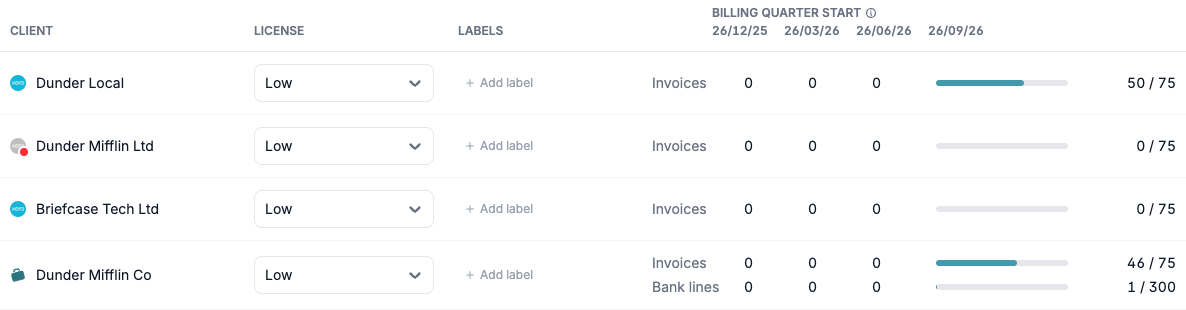
The billing page shows recent quarters of usage for each connection so you can see trends.
Choosing and assigning licenses
Manage licenses from Settings > Billing.
Go to the billing page.
Pick how many licenses you want on each plan. If you signed up yourself, Briefcase suggests a plan for each connection based on what it processed during your trial.
Find the connection in the licenses table and pick its plan. If you don't have a spare license on that plan, Briefcase shows it as a pending change and asks you to confirm the subscription update.
Confirm to apply. Changes take effect straight away, and any prorated charge or credit is invoiced the same day.
Connections without a license can't be opened until you assign one, and they won't be auto-upgraded. During your free trial every connection is available without a license.
Partner pricing for accounting firms
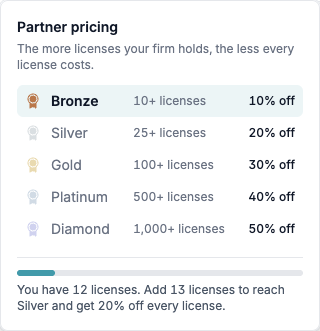
The more licenses your firm holds, the less every license costs. Partner levels are based on the total number of licenses on your subscription, whether or not they're assigned yet.
Partner level | Licenses | Discount on every license |
|---|---|---|
Bronze | 10+ | 10% |
Silver | 25+ | 20% |
Gold | 100+ | 30% |
Platinum | 500+ | 40% |
Diamond | 1,000+ | 50% |
Moving up a level applies straight away to all your licenses, including the ones you already had.
Dropping below a level (by removing licenses) changes your price from your next monthly bill.
Your current level shows on the billing page, along with how many licenses you need for the next one. Partners can also download a partner badge for their website from the same page.
Partner pricing applies to accounting firms on our current pricing.
Supplier payments
Each connection includes 3 free supplier payments per quarter. After that, each payment costs 25p plus VAT, added to your next invoice. Payments during your free trial aren't charged, and a payment that fails isn't charged (if it was already charged, we credit it back).
Auto-upgrade
Auto-upgrade is on by default. It keeps connections within their plan without you having to watch usage. When a connection goes 10% over either of its quarterly allowances, Briefcase moves it to the plan that fits.
How it works
A connection reaches 110% of its documents allowance or, on Briefcase Ledger, its bank transactions allowance (for example, 83 documents or 330 bank transactions on Low).
Briefcase picks the lowest plan that fits its usage. If usage has grown a lot, that can be more than one plan up.
If you have a spare, unassigned license on that plan, Briefcase uses it. Otherwise it upgrades the connection's license and charges the prorated difference the same day.
Work on the connection carries on without interruption.
If auto-upgrade uses a spare license, the connection's previous license stays on your subscription as a spare. Remove it from the billing page if you don't need it.
Turning auto-upgrade on or off
Admins can turn auto-upgrade on or off at any time from the billing page.

What happens if I turn it off?
If auto-upgrade is off, a connection that reaches 100% of either allowance has its billable actions paused until the next quarter starts or you upgrade its license. That includes:
Uploading documents (in the app, by email, WhatsApp or connected AI assistants)
Publishing invoices, receipts and credit notes
Importing and exporting bank statements
Reconciling supplier statements
Reconciling and posting bank transactions in Briefcase Ledger
Downgrades and removing licenses
You can move a connection to a lower plan unless it has already used more than that plan's allowance this quarter. For example, a Medium connection that has published 100 documents this quarter can't move to Low (75 documents) until the next quarter.
You can remove spare licenses at any time. To remove a license that's in use, unassign it from its connection first.
Reductions take effect straight away and are credited on a prorated basis. If you're an accounting firm and the change drops you below a partner level, your new price applies from your next bill.
Who can manage billing
Only admins can:
View the billing page
Buy, upgrade, downgrade or remove licenses
Turn auto-upgrade on or off
View past invoices and update payment details
Team members can assign an available license when they connect a new client. Change who has admin access on the organisation settings page.
FAQs
Do bank transactions count if I use Xero or QuickBooks?
No. Bank transaction allowances only apply to connections whose books are kept in Briefcase Ledger.
How are auto-upgrades billed?
The prorated difference for the rest of the month is invoiced and charged the same day. From then on, the new plan appears on your monthly bill.
What if a connection is only slightly over its allowance?
With auto-upgrade on, nothing happens until it's 10% over. For example, a Low connection doesn't upgrade until it reaches 83 documents (110% of 75) or 330 Ledger bank transactions (110% of 300).
What if a connection outgrows Ultra ×8?
Get in touch at support@briefcase.so and we'll agree a plan that fits. With auto-upgrade on, work on the connection isn't paused in the meantime.
Does archiving a document reduce my count?
No. A document counts the first time it's published, exported or reconciled, and stays counted if you archive it later.
How is my partner level worked out?
From the total number of licenses on your subscription, assigned or not. Adding licenses that take you up a level lowers the price of every license straight away.
Is there a minimum number of licenses?
Not on current pricing. Firms on pre-October 2026 pricing, or with an agreed custom plan, keep the minimum in their agreement.
When does my billing quarter reset?
On the quarterly anniversary of your subscription start date, not the calendar quarter. You can see your current quarter's dates on the billing page.
What happens if a connection has no license?
It can't be opened until you assign a license, and it won't be auto-upgraded. Assign one from the billing page.
What is a "pending change" when I assign a license?
If you pick a plan where you don't have a spare license, Briefcase flags it as a pending change. You'll be asked to confirm the subscription update before the new license is bought and assigned.
Got a question we haven't covered? Email support@briefcase.so.